How to Fix: "Updating Failed. The Response Is Not a Valid JSON Response" in WordPress
If you use the modern WordPress Gutenberg block editor, you have likely encountered this modal error:
"Updating failed. The response is not a valid JSON response."
(or "Publishing failed. The response is not a valid JSON response.")
This error prevents you from saving, updating, or publishing blog posts and pages.
1. Why Does This Error Happen?
When you click "Update" or "Publish" in the Gutenberg block editor, your browser makes a background HTTP POST request to the WordPress REST API endpoint:
/wp-json/wp/v2/posts/{id}
The browser expects WordPress to respond with a clean, RFC 8259-compliant JSON payload like:
{
  "id": 142,
  "status": "publish",
  "title": { "raw": "My New Article" }
}
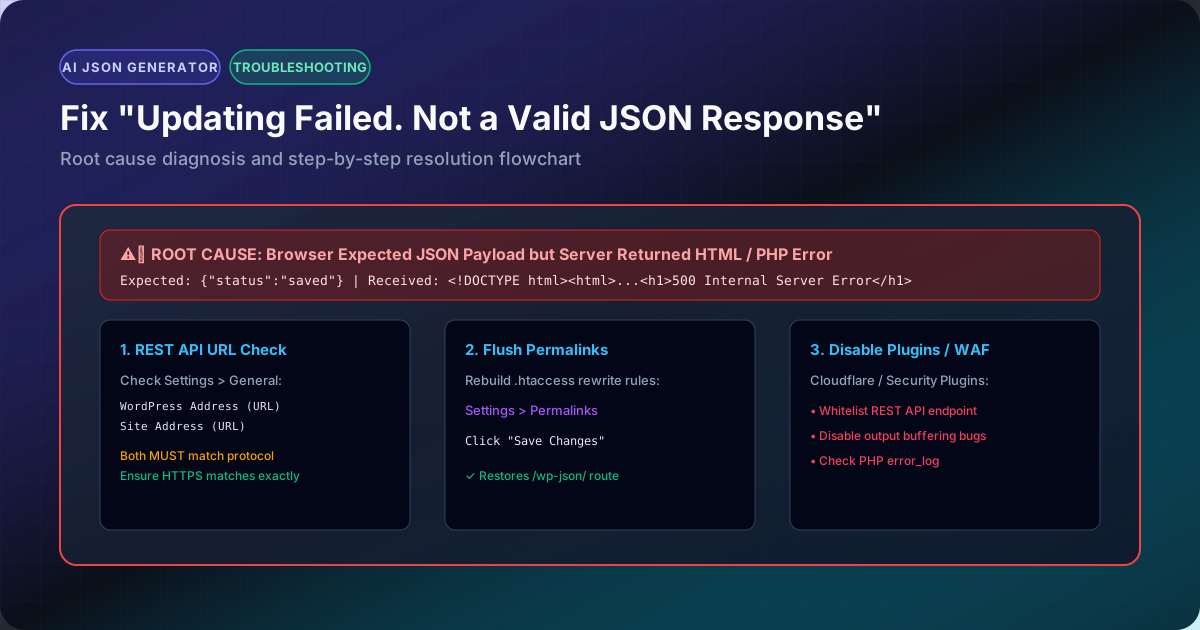
However, if something on your server or CDN intercepts that request and returns HTML, PHP warnings, or a 403 Forbidden page, the browser tries to parse that HTML with JSON.parse() and immediately throws: "The response is not a valid JSON response".
2. How to Inspect What Your Server Is Actually Returning
To solve this in 30 seconds:
- Open your browser's Developer Tools (Press F12 or right-click anywhere and click Inspect).
- Click on the Network tab and check the Fetch/XHR filter.
- In WordPress, click "Update" or "Save Draft" to trigger the error.
- Look for the failed request in red (usually named
posts,autosaves, orpages). - Click on the request and select the Response tab.
Whatever text or HTML appears in that Response tab is the exact reason your WordPress site is failing!
3. The 5 Root Causes & Their Instant Fixes
Fix #1: Flush and Reset WordPress Permalinks
Corrupted .htaccess or Nginx rewrite rules break the /wp-json/ route, causing a 404 HTML page instead of JSON.
- Go to WordPress Admin → Settings → Permalinks.
- Scroll to the bottom and click Save Changes twice without altering any settings. This regenerates your server rewrite rules.
Fix #2: Correct SSL & Site URL Mismatch (Mixed Content)
If your WordPress Address is http:// but your site runs on https://, the browser blocks the REST API.
- Go to WordPress Admin → Settings → General.
- Verify that both WordPress Address (URL) and Site Address (URL) start with exact
https://.
Fix #3: Cloudflare WAF / Firewall Rule Blocking the REST API
If your domain is behind Cloudflare, security rules or Bot Fight Mode may block legitimate WordPress admin Ajax requests with a 403 Challenge page:
- Log into Cloudflare Dashboard → Security → Events.
- Look for blocked requests to path
/wp-json/wp/v2/. - Create a WAF Skip rule for your authenticated admin IP or URI path
/wp-json/*.
Fix #4: Hidden PHP Warnings or Notices (WP_DEBUG)
If a plugin or active theme has a minor PHP warning or notice, and display_errors = On in your server configuration, PHP prints:
<br /><b>Notice</b>: Undefined variable $foo in /wp-content/plugins/...
Even a single line of PHP text printed before the JSON output corrupts the entire payload.
- Open your
wp-config.phpfile. - Set:
define('WP_DEBUG', false);
define('WP_DEBUG_DISPLAY', false);
Fix #5: Validate Your Payload Syntax
If you are passing custom REST API callbacks or custom Gutenberg blocks, verify that your payload structure is 100% valid using our JSON Validator and JSON Linter.