JSON vs JSONL: Key Differences, Performance Benchmarks & When to Use Each
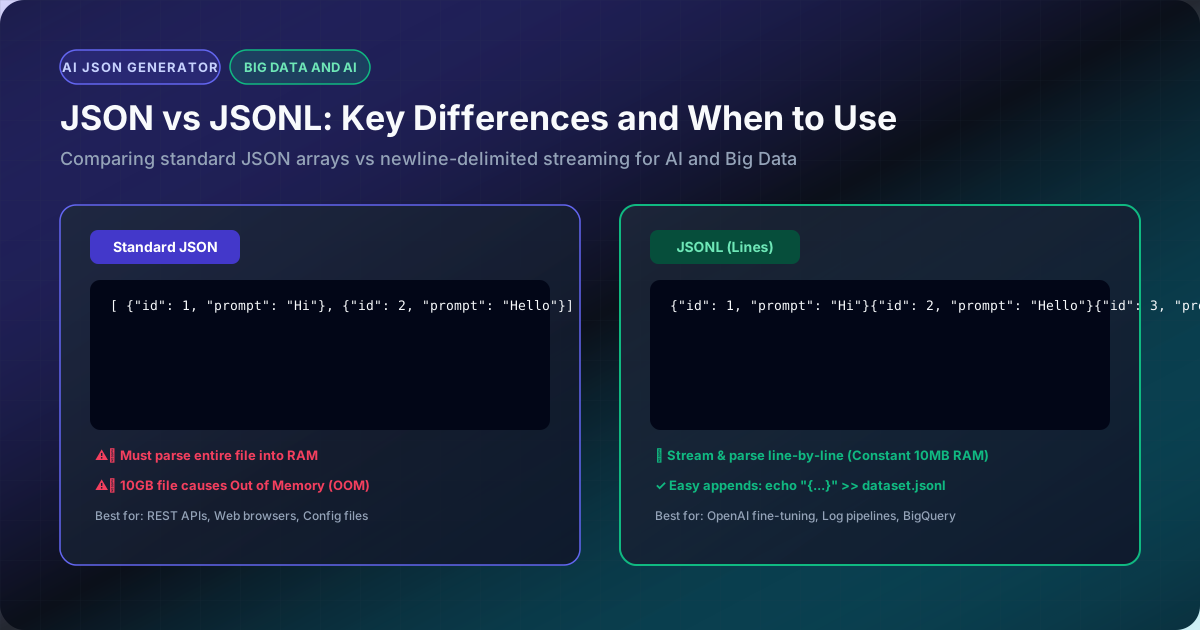
Modern web applications and AI data pipelines process massive volumes of structured records. While standard JSON dominates public REST APIs, JSONL (Newline-Delimited JSON / NDJSON) has become the de facto standard for Big Data streaming, machine learning, and LLM fine-tuning (e.g. OpenAI, Anthropic, HuggingFace).
1. Syntax Comparison
Standard JSON Array:
[
  { "id": 1, "name": "Sarah" },
  { "id": 2, "name": "Marcus" }
]
JSONL (Newline-Delimited JSON):
{"id": 1, "name": "Sarah"}
{"id": 2, "name": "Marcus"}
In JSONL:
- Every individual line is a standalone, valid JSON object.
- Lines are separated by a standard newline character (
- There are no surrounding square brackets
[or commas,between rows.
2. Comparison Matrix
| Feature | Standard JSON | JSONL (Newline Delimited) |
|---|---|---|
| Parsing Strategy | Must load entire file into memory before parsing | Stream and process line-by-line |
| RAM Footprint on 10GB File | ⚠️ Out of Memory (OOM crash) | ✅ Constant 10MB memory usage |
| Append New Records | Difficult (must seek end, remove bracket, add comma) | Trivial (echo "{...}" >> data.jsonl) |
| Corruption Resilience | If one byte is corrupted, entire file fails | If one line is corrupted, remaining 99.9% parses |
| Parallel Processing | Single-threaded serialization | Split by byte offset and process across CPU cores |
| Industry Adoption | REST APIs, Web Browsers, Config files | AI Training, Log pipelines, ClickHouse, BigQuery |
3. Why AI and LLM Pipelines Standardize on JSONL
When fine-tuning models on OpenAI or Anthropic, training datasets are millions of lines long.
If a 50GB dataset were stored as a single JSON array, your worker nodes would crash attempting to deserialize the opening bracket. With JSONL, data loaders read one record at a time using zero RAM.
Easily switch between both formats in your browser using our JSON to JSONL, JSONL to JSON, and JSONL Validator tools!