Fixing "SyntaxError: Unexpected End of JSON Input" in JavaScript & Node.js
The error SyntaxError: Unexpected end of JSON input is one of the most common exceptions encountered by web developers when working with APIs, local storage, and server-side responses.
It means the JavaScript engine was in the process of parsing a JSON string, but the string abruptly stopped before the data structure was syntactically closed.
1. The 5 Root Causes
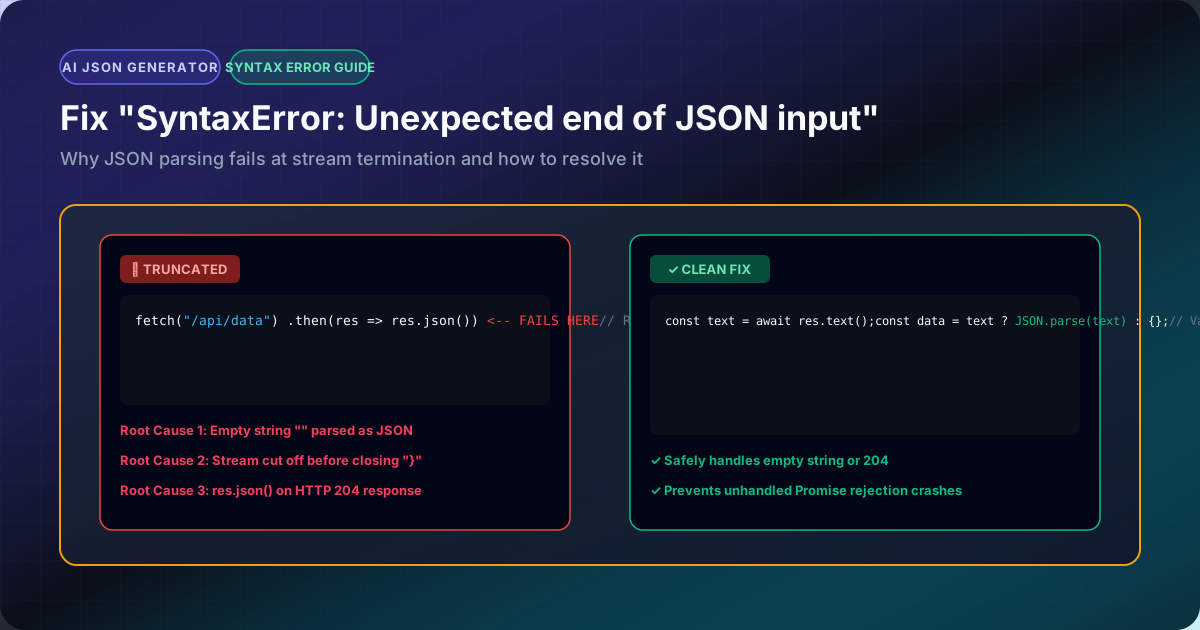
1. Passing an Empty String to JSON.parse()
JSON.parse(""); // ❌ Throws SyntaxError: Unexpected end of JSON input
JSON.parse("   "); // ❌ Throws SyntaxError
An empty string is not valid JSON. The minimum valid JSON primitives are null, 0, "" (an empty string inside quotes), [], or {}.
2. Calling res.json() on an Empty HTTP Response (204 No Content)
When a backend server returns HTTP 204 No Content (common on DELETE or PUT endpoints), there is no body payload.
const res = await fetch('/api/user/1', { method: 'DELETE' });
const data = await res.json(); // ❌ Crashes if server sent empty 204
The Fix:
const res = await fetch('/api/user/1', { method: 'DELETE' });
const text = await res.text();
const data = text ? JSON.parse(text) : null;
3. Reading the Response Body Twice
In modern browser Fetch API and Node.js undici, the body stream can only be read once:
const res = await fetch('/api/data');
const text = await res.text();
const json = await res.json(); // ❌ Crashes! Stream already drained
4. Truncated Network Payloads or Dropped Connections
If a large JSON payload (e.g. 10MB) was cut off mid-transit due to a server timeout or reverse-proxy buffer limit:
{"id": 101, "name": "Sarah Connor", "tags": ["lead
The parser expects closing quotes and brackets "]}, but finds EOF (End of File).
2. The Production-Safe JSON Parsing Pattern
Never call raw JSON.parse() on untrusted inputs without a guard:
export function safeJsonParse<T>(input: string | null | undefined, fallback: T): T {
  if (!input || !input.trim()) {
    return fallback;
  }
  try {
    return JSON.parse(input) as T;
  } catch (err) {
    console.warn("Failed to parse JSON string:", err);
    return fallback;
  }
}
Inspect and format any problematic payloads in our JSON Linter or JSON Validator to immediately pinpoint missing closing braces.